Introduction
QR codes are everywhere today. You can find them on business cards, restaurant menus, product packaging, invoices, event tickets, and even shop windows. Instead of typing long links or contact details, people simply scan a code with their phone and get the information instantly.
The problem is that many QR code tools ask users to create an account, add payment details, or place watermarks on downloaded files.
At
CodePrints QR Code Generator, we wanted to keep things simple.
You can create professional QR codes completely free, without registration, without watermarks, and download them instantly in high quality PNG or SVG format.
Whether you are a business owner, student, freelancer, marketer, or developer, generating a QR code takes less than a minute.
How the QR Code Generator Works
Our QR generator converts your information into a scannable QR code that works with almost every modern smartphone camera.
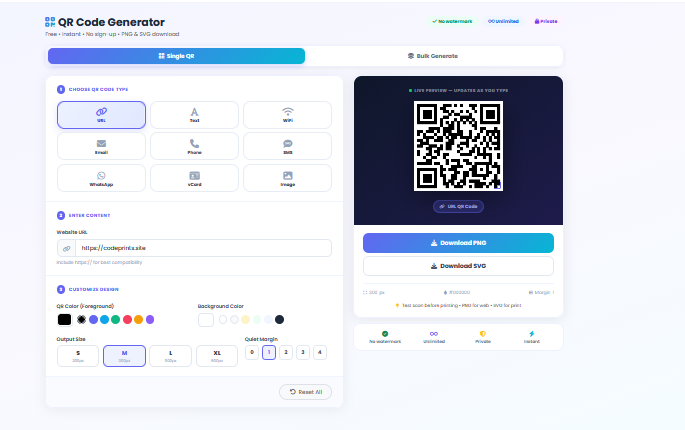
Simply choose the type of QR code you need:
- Website URL
- Text
- WiFi
- Email
- Phone Number
- SMS
- WhatsApp
- vCard Contact
- Images
Enter your information, customize the design if needed, and your QR code is generated instantly in real time.
There is no waiting and no account creation required.
Step-by-Step Guide to Create a QR Code
Step 1: Choose Your QR Code Type
Select the type of QR code you want to create from the available options.
For example:
- URL for websites and online stores
- WiFi for sharing internet access
- WhatsApp for customer support
- Phone for quick calling
- Text for notes or messages
- vCard for business contacts
Step 2: Enter Your Information
After selecting the QR type, enter your information in the input field.
For example:
- Website URL: https://yourwebsite.com
- Phone Number: +92xxxxxxxxxx
- WiFi Name and Password
- WhatsApp Number
- Contact Details
The QR code preview updates automatically while you type.
Step 3: Customize Your QR Code Design
Your QR code doesn't need to be black and white.
You can customize:
- QR Code Color
- Background Color
- Output Size
- Margin Spacing
- Quiet Zone
This helps businesses match QR codes with their brand colors and marketing materials.
Step 4: Preview Your QR Code Instantly
The live preview panel shows exactly how your QR code will look before downloading.
This saves time and allows you to make changes instantly.
Step 5: Download Your QR Code
Once you are satisfied with the design, download your QR code instantly.
Available download formats:
PNG is ideal for social media and websites, while SVG is perfect for printing and large banners.